Click-to-WhatsApp Ads: Setup, Costs and Scripts (2026)
Set up click-to-WhatsApp ads for your service business, see what they cost after Meta’s 2026 changes and copy first-reply scripts that qualify leads. Start here.
Short answer: click-to-WhatsApp ads send people from Facebook and Instagram straight into a WhatsApp chat with you. For service businesses they usually bring warmer leads than forms, because the person is already talking to you. Set them up in Meta Ads Manager with the Leads objective and WhatsApp as the conversion location, reply within seconds and you pay only for the ad: the chat itself stays free inside Meta's free entry point window.
| What you need to know | Detail |
|---|---|
| Campaign objective | Leads, with WhatsApp as the conversion location |
| What you pay Meta | The ad spend. Messages are free in the free entry point window |
| Free entry point window | Opens when you reply within 24 hours; can last up to 7 days (Meta) |
| Biggest risk | Slow replies. The lead tapped your ad to talk now |
| Metric that matters | Cost per qualified lead and cost per booking, not cost per conversation |
Why click-to-WhatsApp ads suit service businesses
A form fill is a name and a number you have to chase. A WhatsApp chat is a person asking you a question right now. For businesses that sell consultations, appointments and quotes, that difference matters:
- The lead starts the conversation, so they expect your reply and are more likely to answer follow-ups.
- You can qualify in the chat: service, budget, timing and location, before your team spends time on a call.
- The thread stays on their phone, so reminders and follow-ups reach them where they already are.
The catch is speed. If an ad sends 40 chats on a Saturday and nobody replies until Monday, you paid for 40 clicks and lost most of them. That's why this guide covers the ad setup and what happens in the first minute of the chat. For a side-by-side comparison with lead forms, read click-to-WhatsApp ads vs lead forms.
Before you start
- Access to Meta Ads Manager for the ad account you want to use
- A Facebook Page connected to the WhatsApp number that will receive chats
- A WhatsApp Business number for ads (the same number you want an AI agent to answer)
- A plan for replying within seconds, around the clock. A CXWizard AI agent covers this
If you still need to connect WhatsApp to CXWizard, see how to connect your WhatsApp Business account to CXWizard.
Campaign setup in six steps
Step 1: Open Ads Manager and create a campaign
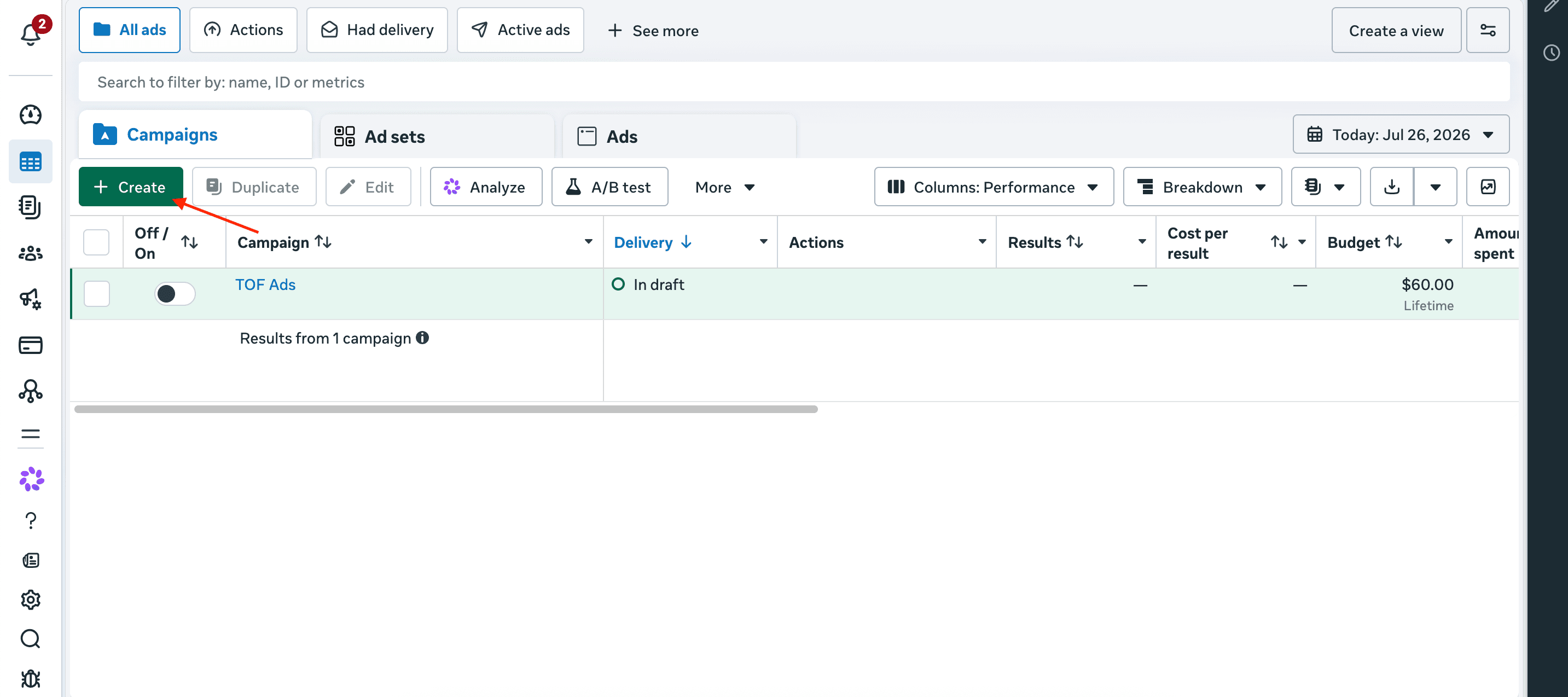
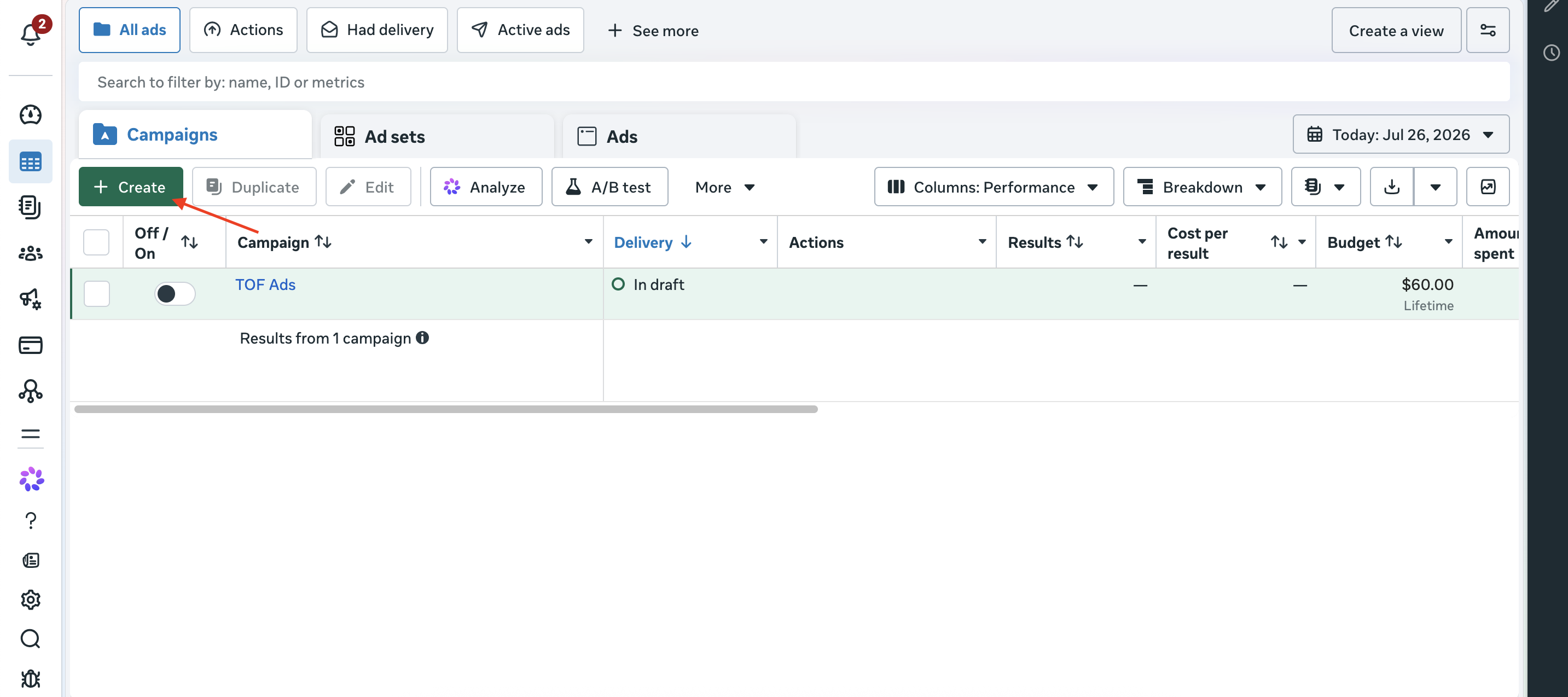
Go to Meta Ads Manager, open the Campaigns tab and click + Create.
Step 2: Choose the Leads objective
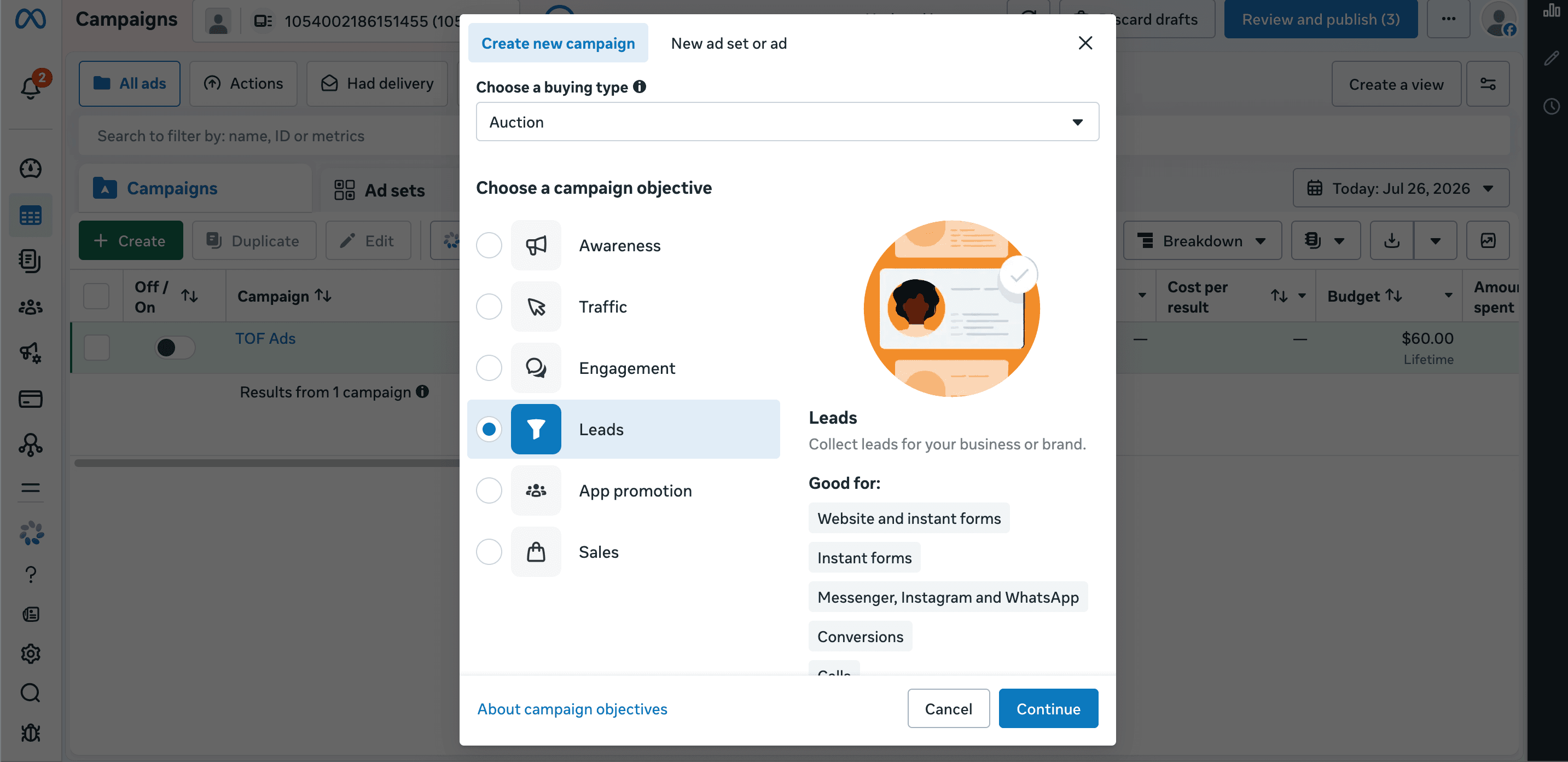
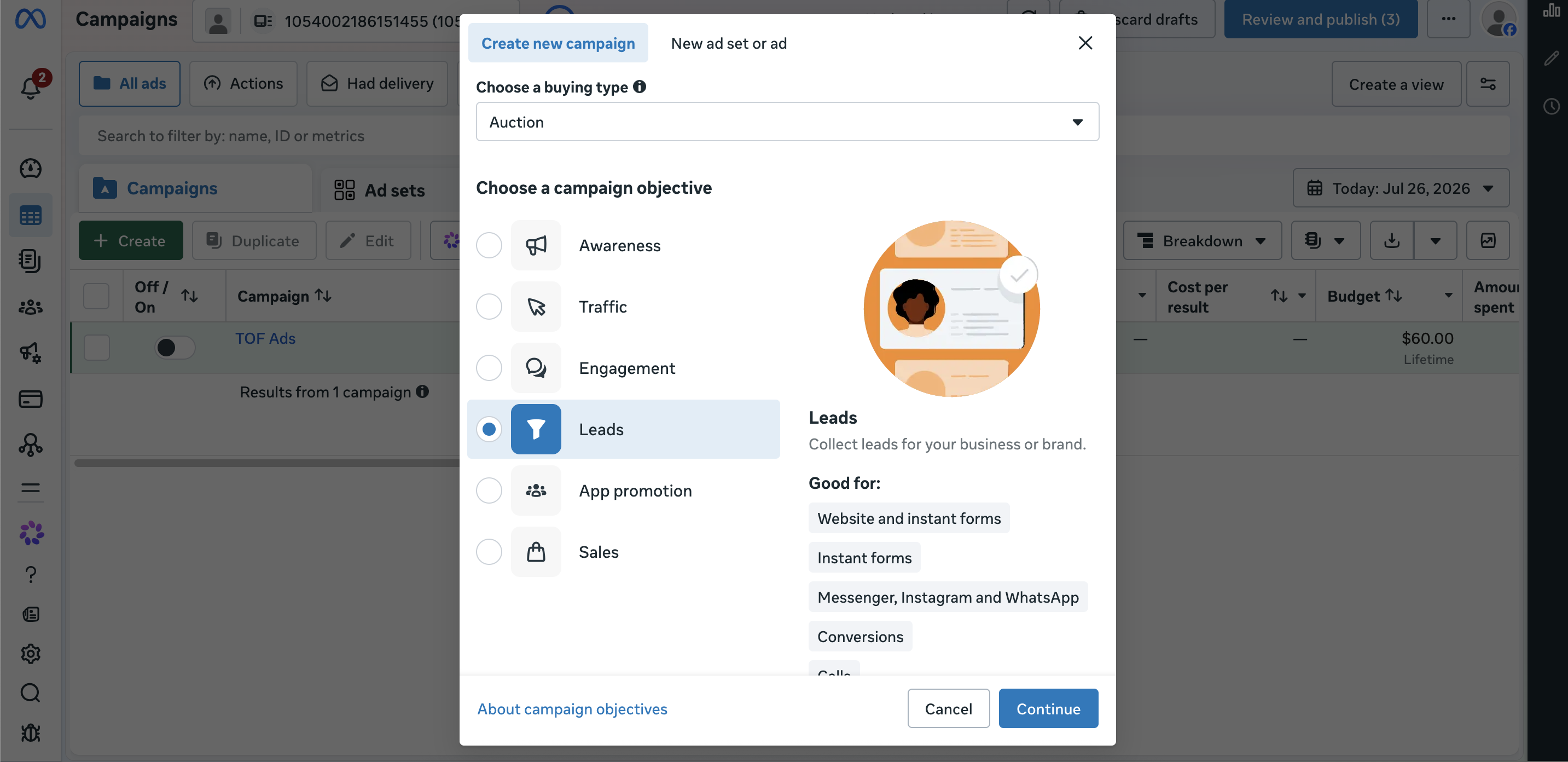
Leave buying type as Auction unless your account requires something else. Under Choose a campaign objective, select Leads, then click Continue.
Step 3: Name the campaign and set the budget
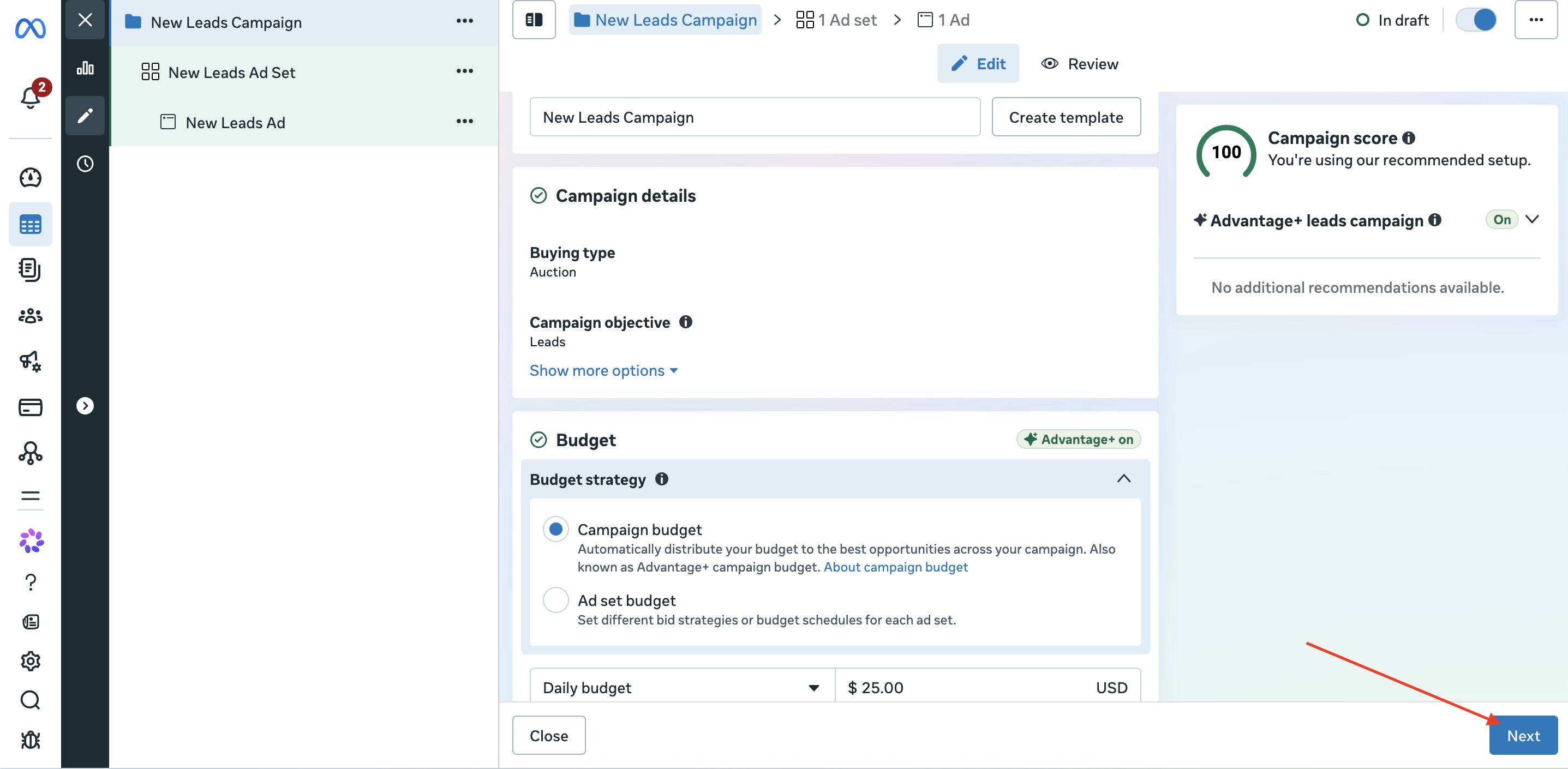
Use a clear name such as CTWA - Teeth whitening - Nov. Check the objective shows Leads, set a daily or lifetime budget, then click Next.
Step 4: Set the conversion location to WhatsApp
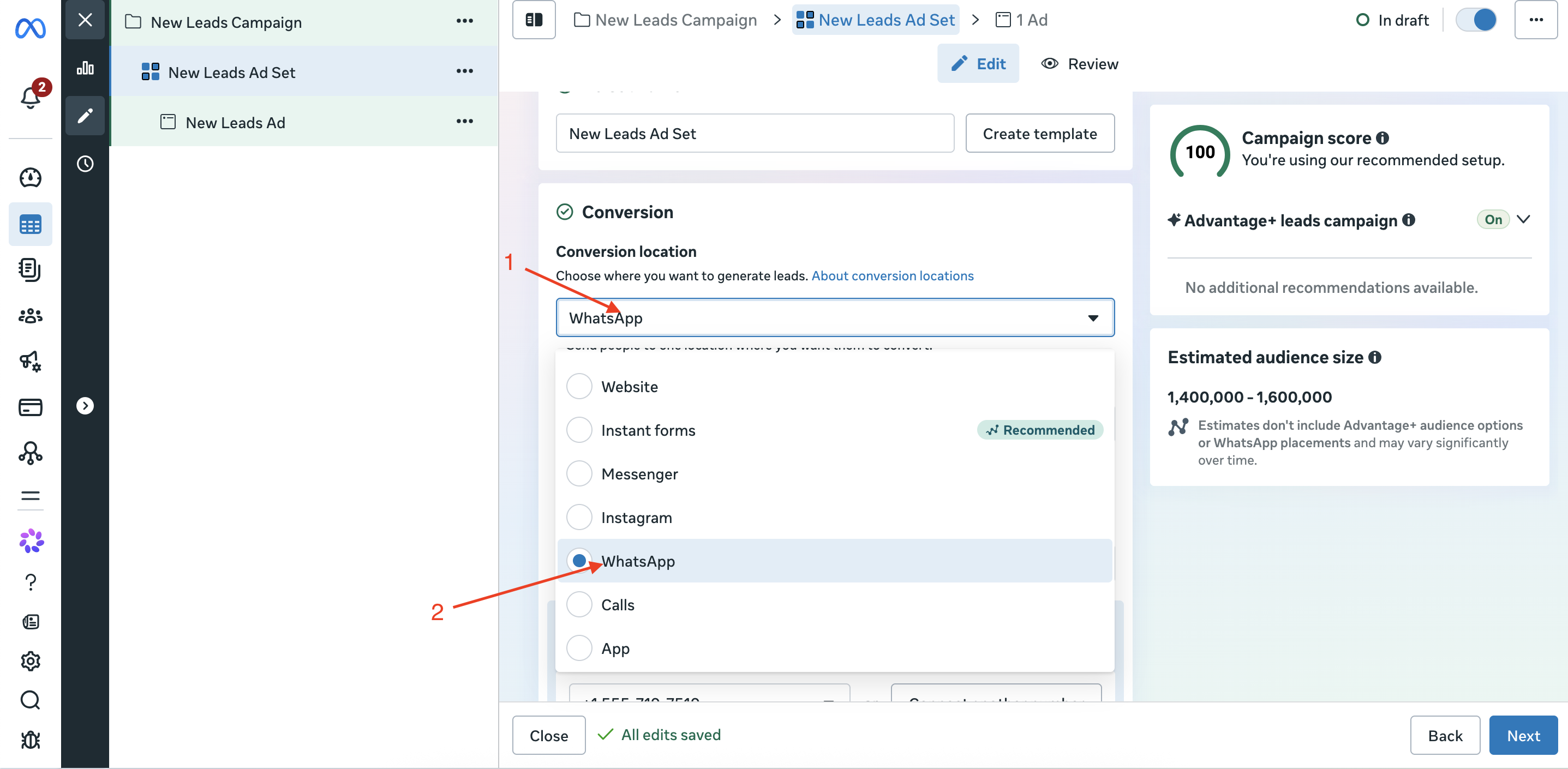
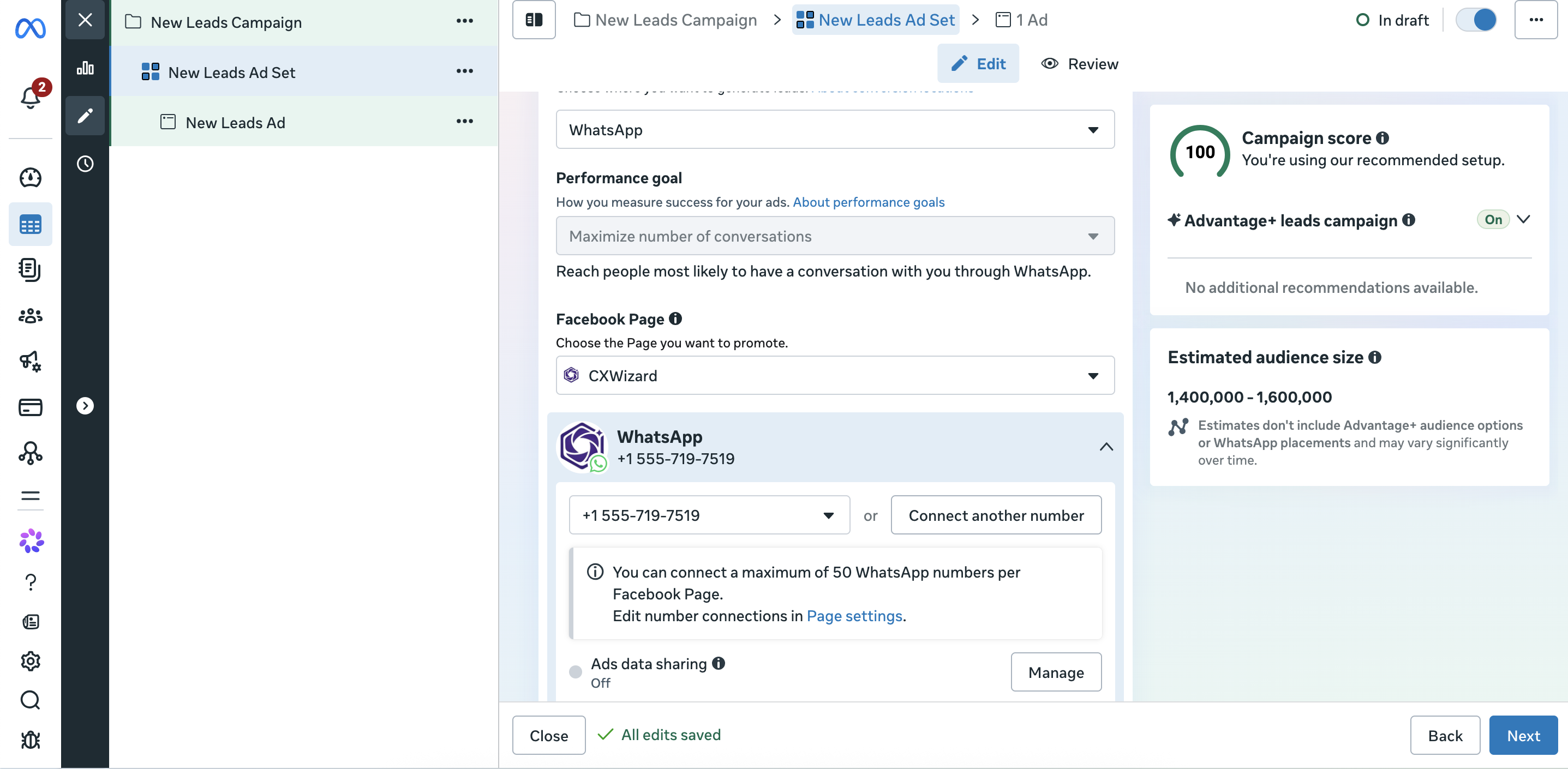
In the ad set, open Conversion location and select WhatsApp. You can set the performance goal to Maximize number of conversations.
Step 5: Connect the WhatsApp number
Choose the Facebook Page linked to your WhatsApp number, then select the number the ad should open chats with. Use the same number you connect to CXWizard, so every ad chat lands in your AI agent's inbox.
Step 6: Build the ad and publish
Add your creative, primary text and headline, choose a Send message or WhatsApp message call to action, and publish. The ad's promise ("Get your price on WhatsApp") should match the first reply your customer receives.
Targeting ideas by industry
Start broad with a tight location radius and let Meta find the people who start chats. These ideas are starting points for your creative and audience, not guarantees of results.
| Industry | Ad angle | Audience ideas |
|---|---|---|
| Dental and med spas | "See prices and before-and-after photos on WhatsApp" | Adults within 10 to 15 km; interests in cosmetic dentistry, skincare or weddings |
| Hair transplant clinics | "Free hair assessment. Send us a photo on WhatsApp" | Men 25 to 55 in your city and travel catchment |
| Real estate agents | "New 2-bed listings in [area]. Get the list on WhatsApp" | Renters and buyers in the area; people who recently moved |
| Home services (plumbing, HVAC) | "Send a photo of the problem, get a price in minutes" | Homeowners within your service radius |
| Coaches and consultants | "Free 15-minute call. Message us to book" | Interests related to your niche; lookalikes of past clients |
| Travel agencies | "Holiday packages from [price]. Chat with an expert" | Adults in your country; interests in the destination |
First-reply scripts
The first reply decides whether the chat becomes a lead. Keep it short, deliver what the ad promised and ask one question. Copy these and change the bracketed parts.
Dental clinic (whitening ad)
Hi, thanks for messaging [Clinic]. In-clinic whitening is [price] and takes about an hour. Have you had whitening before, or would this be your first time?
Real estate (listing ad)
Hi, thanks for your interest. Here are this week's 2-bedroom listings in [area]. To narrow it down: are you looking to buy or rent, and what's your budget?
Home services (photo ad)
Hi, thanks for getting in touch with [Company]. Send us a photo of the problem and your postcode, and we'll give you a price range and the next available slot.
Coach or consultant
Hi, thanks for reaching out. Happy to book your free 15-minute call. What's the one thing you'd most like help with right now?
How AI qualifies the lead before your team steps in
When your ads work, chats arrive faster than anyone can answer. A CXWizard AI agent replies within seconds, day and night and handles the qualifying so your team only talks to people who are ready.
- Greets and answers using your prices, services and policies from the knowledge base.
- Asks the qualifying questions you choose: service, budget, timing, location.
- Books the appointment through Calendly, or collects the details for a callback.
- Hands off to your team with the full conversation when a lead is ready or needs a person.
- Follows up with people who went quiet, using follow-up sequences.
Set it up:
- Sign up for CXWizard and connect the WhatsApp number used in your ads (connection guide).
- Create an agent with a prompt focused on ad leads: match each ad's promise, ask your qualifying questions, then offer to book.
- Add your prices, services and FAQs to the knowledge base.
- Turn the agent on and test it by tapping your own ad.
For the full setup flow, see getting started with CXWizard, and for routing handoffs to the right person, see how to let AI manage your inbox.
Real example: Ryan Clinic, a hair transplant clinic in India, runs click-to-WhatsApp ads and uses CXWizard to reply. It handled about 26,000 sales conversations in its first 60 days (case study).
What click-to-WhatsApp ads cost
You pay for two things:
- The ad. Standard Meta ad pricing applies, set by your budget and bidding. The ad itself is never free.
- WhatsApp messages. When a person messages you from the ad and you reply within 24 hours, Meta opens a free entry point window. During it, every message you send is free, including templates. Meta's help center describes it as 72 hours; since late September 2026, Meta's pricing documentation says it can stay open for up to 7 days for ad chats, rolling out gradually (Meta help center, Meta pricing documentation). After the window closes, normal per-message rates apply.
Two details worth knowing:
- If you use Meta Business Agent (Meta's own AI), its token charges apply even inside the free window. AI from another provider, such as CXWizard, is billed by that provider instead.
- If you reply after 24 hours, the free window never opens. Fast replies save money as well as leads.
Use the pricing calculator to estimate your monthly CXWizard cost, and see how WhatsApp per-message pricing works for the rest of Meta's rates.
Track cost per lead, not cost per chat
Ads Manager reports cost per messaging conversation started. That number flatters you: it counts every chat, including "how much?" and silence. Track three numbers instead:
| Metric | Formula | Where to get it |
|---|---|---|
| Cost per conversation | Ad spend ÷ conversations started | Ads Manager |
| Cost per qualified lead | Ad spend ÷ chats that answered your qualifying questions | Tag qualified chats in your inbox |
| Cost per booking | Ad spend ÷ appointments booked from the ad | Your calendar or booking tool |
Worked example (illustrative numbers): you spend $600 in a month and get 150 conversations ($4 each). Sixty answer your qualifying questions ($10 per qualified lead) and 20 book a consultation ($30 per booking). If your average client is worth $800, that campaign is profitable. If only five had booked because replies were slow, the same ads would cost $120 per booking.
To estimate how much missed chats cost you, run the free revenue leak audit.
Tips
- Match the ad promise to the first reply. "Get pricing on WhatsApp" means the reply leads with price.
- Keep the WhatsApp number, Facebook Page and CXWizard on the same business setup so chats do not land in the wrong inbox.
- Start with a modest daily budget, check chats arrive and the AI replies correctly, then scale.
- Review the first 50 conversations and tighten your prompt around common objections.
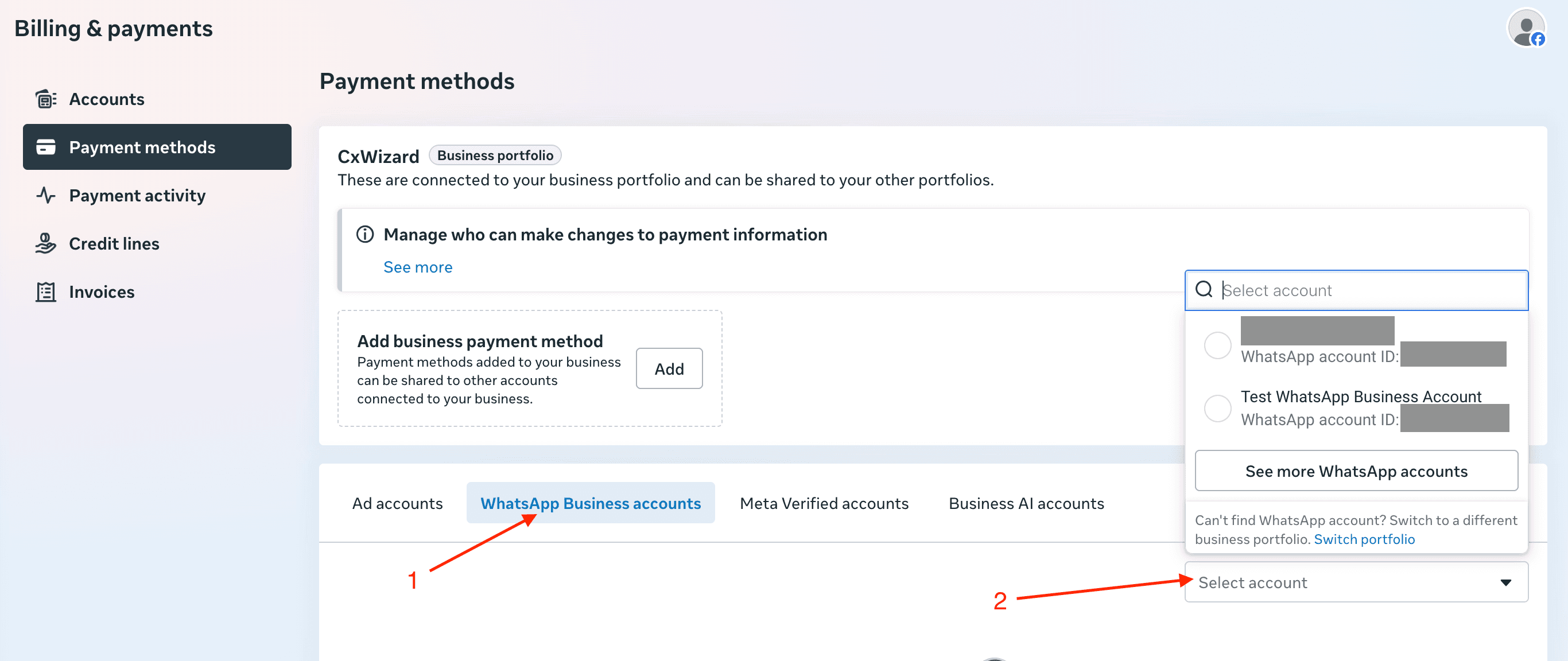
- Keep a payment method on your WhatsApp account so delivery is not interrupted (how to add one).
Related guides
- Click-to-WhatsApp ads vs lead forms: which brings better leads for your business.
- Instagram comment to DM automation for free: capture leads from organic posts too.
- WhatsApp statistics 2026: the latest numbers and Meta changes.
Ready to answer every ad lead in seconds? Start your 14-day free trial, no credit card required.
Frequently asked questions
What are click-to-WhatsApp ads?
Click-to-WhatsApp ads are Facebook and Instagram ads with a button that opens a WhatsApp chat with your business. Instead of filling in a form, the lead starts a conversation in one tap, and you reply on WhatsApp.
How much do click-to-WhatsApp ads cost?
You pay Meta for the ad like any other ad, set by your budget and bidding. The WhatsApp messages in the chat are free inside Meta's free entry point window, which opens when you reply within 24 hours and can last up to 7 days. Meta Business Agent token charges still apply if you use Meta's own AI.
Are click-to-WhatsApp ads good for service businesses?
Yes, when you can reply fast. Clinics, salons, real estate agents and home service companies get a real conversation instead of a form fill, but leads go cold if nobody answers within minutes, so most pair the ads with an AI agent.
Which campaign objective should I use for click-to-WhatsApp ads?
Choose the Leads objective in Meta Ads Manager and set the conversion location to WhatsApp, then pick the WhatsApp number connected to your Facebook Page.
How do I track cost per lead from click-to-WhatsApp ads?
Divide ad spend by qualified conversations, not by all conversations. Ads Manager shows cost per messaging conversation started; tag qualified leads in your inbox so you can count them and calculate a real cost per qualified lead and per booking.
What should the first reply to a click-to-WhatsApp ad say?
Match the ad's promise, give the information they asked for and ask one easy qualifying question, such as which service they want or when they would like to come in. Reply within seconds, which is where an AI agent helps.